
vivo T4 5G Unboxing & First Look - Best Midrange Smartphone?

Big Battery
The 7300 mAh High-Density Battery ensures exceptional endurance, delivering long-lasting power. By leveraging vivo’s signature slim stacking expertise and innovative space utilization, T4 achieves significant upgrades in battery with a Big Battery, 7300 mAh, while maintaining virtually the same thickness

Slim Smartphone
The 3rd-Generation Silicon-Carbon Anode Technology boosts energy density, delivering a large battery capacity in a slim design. The 7300 mAh High-Density Battery ensures exceptional endurance, delivering long-lasting power.
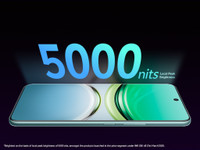
Bright Quad Curved Smartphone
The 5000-nits local peak brightness ultra-bright display delivers vivid colors and sharp details, while the 120 Hz refresh rate ensures smooth visuals. AI eye protection reduces eye strain for a more comfortable viewing experience.

Flagship Power, Smooth Performance. The Snapdragon 7s Gen 3 Processor offers lightning-fast processing, ultra-smooth multitasking, and enhanced gaming that comes with its efficient 4 nm TSMC process.

50 MP Sony IMX882 AI Camera
The Sony IMX882 camera delivers crystal-clear images with AI-enhanced precision, ensuring the shot is sharp and vibrant.

Military Grade Durability
Built for tough conditions, vivo T4 5G meets military-grade durability standards for exceptional durability. Military-Grade Certified MIL-STD-810H Tests, Comprehensive Cushioning Structure, Shock-Absorbing Design, Shield Glass - Twice-Strengthened Glass, Drop-Resistant Protective Film - Laminated Protective Layer

4K Video Recording
Both Front and Rear Cameras Support 4K Video Recording at 30 FPS. Shoot ultra-clear 4K videos with sharp details and lifelike colors.
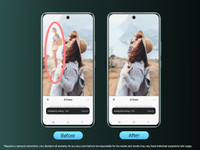
AI Erase
Tap, Erase, Enjoy. Quickly erase unwanted elements. Preserve what really matters to you.

AI Photo Enhance
Restore sharpness to faded images with AI-powered enhancement. Bring Focus and Vividness Back.

Ultra Game Mode
Ultra Game Mode: Instant Panel Switching with the Sidebar. AI Game Voice Changer Transforms Your Voice for Interactive Fun. 4D Game Vibration: Instant Responses for Immersive Gaming Experience

Funtouch OS 15
AI Note Assist: Automatically organizes notes, summarizes key points, extracts to-dos, and translates content for effortless productivity. Super Documents: Automatically enhance, straighten scanned documents, and remove shadows from them with AI-based optimization. Circle to Search: Search any image, video, or text on your screen. Circle, highlight, scribble, or tap to pinpoint.
- Accelerometer, Ambient Light Sensor, Proximity Sensor, E-Compass, Gyroscope, Infrared Remote Control, In Display Optical Fingerprint Sensor, Eccentric Rotating Mass Vibration Motor